> For the complete documentation index, see [llms.txt](https://resources.viewrail.com/llms.txt). Markdown versions of documentation pages are available by appending `.md` to page URLs; this page is available as [Markdown](https://resources.viewrail.com/install/signature-cable-railing/tension-kit-installs/inside-post-mount-to-angle.md).
# Inside Post Mount to Angle
### Tools Needed for This Installation
{% columns %}
{% column %}
{% endcolumn %}
{% column %}
{% endcolumn %}
{% column %}
{% endcolumn %}
{% column %}
{% endcolumn %}
{% endcolumns %}
{% columns %}
{% column %}
{% endcolumn %}
{% column %}
{% endcolumn %}
{% column %}
{% endcolumn %}
{% column %}
{% endcolumn %}
{% endcolumns %}
### Order of Installation and Hardware
Through hundreds of on site installations, we have come up with the best order to install posts into your system depending on what posts are being used. Please review the [Signature Post Order of Installation](/install/signature-cable-railing/post-order-of-installation.md) table and compare it against your order contents to find the best way for you to have an easy installation.
### Installation Steps
{% columns %}
{% column %}
* Take the loose end of your cable spool and slide the cable through the posts on the run you are working on
* It is typically easiest to run the cable up through the bottom post towards the top post
* As you are running the cable through the posts, place the metal sleeves on the cable facing the post hole to\
which they will attach
* Steep Adhesive sleeves will attach to each 5/16" hole on an angled run
{% endcolumn %}
{% column %}
* Slide the loose end of the cable through the Adhesive Sleeve, then the Termination Washer, and into the Cable Stop
* Crimp the Cable Stop on to the end of the cable, then turn it 90° and crimp it again
*Note: In order to free a Termination washer from the metal frame they come on, you must bend one back and forth a couple times and it will break free*
{% endcolumn %}
{% endcolumns %}
{% columns %}
{% column %}
* Insert the Cable Stop into the 5/16" hole
* Then turn the Termination Washer (shown above) and slide it into the 5/16" hole as well
* Pull the cable back and the Cable Stop and Termination Washer will lock against the inside of the post
{% endcolumn %}
{% column %}
* Return to the other end of the run where the Angle Tension Kit will be installed nearest the spool, and pull the cable tight for the full run
* Place painter’s tape on the cable where the cable meets the inside edge of the post
{% endcolumn %}
{% endcolumns %}
{% columns %}
{% column %}
* Use the side cutting tool located below the main crimping head to cut your cable
* Slide the cable through the cable cutter and cut the cable 3" - 4" extra past the outside edge of the post
{% endcolumn %}
{% column %}
* Remove the cable from the post
* Add and mark 1½" past the painter’s tape
* Cut the cable on this mark
{% endcolumn %}
{% endcolumns %}
{% columns %}
{% column %}
* Before continuing, confirm that all your needed sleeves are in place on the cable run
* This will be the last time you will be able to add sleeves on the cable.
{% endcolumn %}
{% column %}
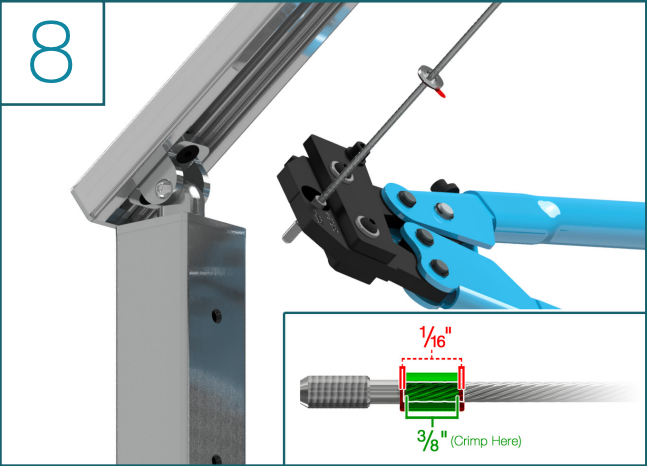
* Crimp a Threaded Crimp fitting onto the second end of the cable
* Crimp the Threaded Crimp Fitting then turn it 90° and crimp it again
{% endcolumn %}
{% endcolumns %}
{% columns %}
{% column %}
* Insert the Threaded Crimp Fitting into the 5/16" hole on the inside face of the post
* Then, insert the Tension Receiver into the ½" hole on the outside face of the post
* Meet both in the middle of the post and thread the Tension Receiver onto the Crimp Fitting four full turns
{% endcolumn %}
{% column %}
* Slide the protective Neoprene Sleeve onto the cable near the post you are working on
* Firmly grasp the sleeve with pliers and use the supplied 5/32" Allen wrench to tighten the Tension Receiver only snug enough to hold in place
{% endcolumn %}
{% endcolumns %}
{% columns %}
{% column %}
* Remove the plastic cover on the Adhesive Sleeve and firmly press the sleeve against the 5 /16" holes on the run
* After all the cable runs are done and the Adhesive Sleeves are placed, use the Allen wrench to tighten the remaining side of the cable run in sequence
* Holding the cable with the pliers & neoprene sleeve, tighten until the cable is taut and then turn the Tension Receiver another half turn
*\*Before tensioning any cable infill, please ensure all posts and handrail are fully installed*
{% endcolumn %}
{% column %}
{% endcolumn %}
{% endcolumns %}
***
### Get Help from Us
Is this not the product you're looking for? Troubleshoot your issue by contacting our customer service team. [866-432-0541](tel:8664320541) or
---
# Agent Instructions
This documentation is published with GitBook. GitBook is the documentation platform designed so that both humans and AI agents can read, navigate, and reason over technical content effectively. Learn more at gitbook.com.
## Querying This Documentation
If you need additional information that is not directly available in this page, you can query the documentation by asking a question.
Perform an HTTP GET request on the following URL with the `ask` and `goal` query parameters:
```
GET https://resources.viewrail.com/install/signature-cable-railing/tension-kit-installs/inside-post-mount-to-angle.md?ask=&goal=
```
`ask` is the immediate question: it should be specific, self-contained, and written in natural language.
`goal` is what the user is ultimately trying to achieve, the reason they need the answer. Sharing it helps GitBook give you a better, more relevant answer. A goal is most helpful when it describes the outcome the user wants rather than restating the question. For example, with `ask=how do I create an API token`, a goal like `automate deployments from our CI pipeline` lets GitBook tailor the answer to that use case.
The response will contain a direct answer to the question and relevant excerpts and sources from the documentation.
Use this mechanism when the answer is not explicitly present in the current page, you need clarification or additional context, or you want to retrieve related documentation sections.